Claude Code hooks: the programmable boundary around the model
Hooks are the one mechanism that doesn't depend on the model remembering a rule — they run real code at key points in the execution flow and can allow, deny, or ask.
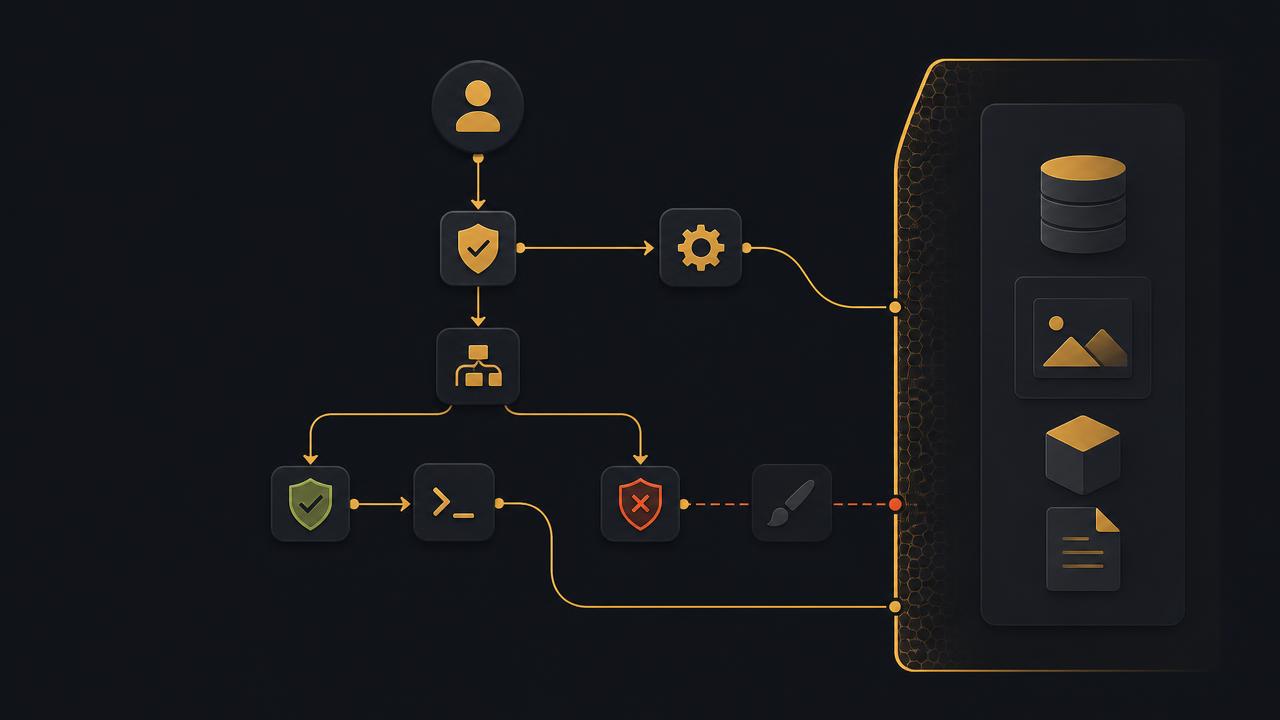
// key takeaways
- ›A hook is a programmable control mechanism that runs inside Claude Code's execution flow — not another prompt.
- ›28 events across the lifecycle; 5 hook types (command, http, mcp_tool, prompt, agent).
- ›Blocking events resolve by strictest result: deny > ask > allow.
- ›Exit code 2 is a system error (blocking); exit 1 is non-blocking and ignored; exit 0 + JSON can return a policy decision.
- ›Skills and subagents can register scoped hooks in their frontmatter, cleaned up when they finish.
On this page
The short answer
CLAUDE.md can tell Claude how it should behave, but whether Claude follows it depends on the model's judgment. Hooks are a different answer: a programmable control mechanism that runs inside Claude Code's execution flow.
When Claude is about to call a tool, write a file, or run a command, hooks step in before the action and decide whether to allow it, block it, or ask for human confirmation. The judgment doesn't depend on whether the model remembers a rule — it depends on code you wrote in advance. That's the core guarantee.
Hook structure
Hooks live in settings.json, organized in three nested layers:
{
  "hooks": {
    "PreToolUse": [
      {
        "matcher": "Write",
        "hooks": [
          { "type": "command", "command": "echo 'a write happened'" }
        ]
      }
    ]
  }
}
- Event —
PreToolUse,PostToolUse,Notification, etc. The registry of where you want to intervene. - Matcher — when this group fires.
Writematches only file writes; omit to match all. - Hook — the actual logic, e.g. a command or HTTP call.
The official system currently lists 28 events and 5 hook types (command, http, mcp_tool, prompt, agent). Hooks can be defined in six locations: user settings, project, local project, managed policy, plugin hooks, and skill/agent frontmatter.
Blocking vs non-blocking, and the exit-code gotcha
Events fall on two paths:
- Main-flow events (SessionStart, PreToolUse, PermissionRequest, PostToolUse, Stop) can be blocking — they pause the flow and their result decides what happens next.
- Side-path events (Notification, ConfigChange) are non-blocking — they observe and notify without intercepting.
For blocking events, there are two ways to block, and they mean different things:
exit 2— a system-level error (missing tool, broken environment). The model senses the operation failed and may try another way around it.exit 0+ JSON with a policy decision like{"decision": "deny"}— a business-rule rejection. The model accepts the decision and adjusts. JSON can also attach areasonand modify tool input viaupdatedInput.
> The hidden trap: exit 1 is non-blocking in Claude Code's hook system. Only exit 2 truly blocks the flow.
Merge and decision mechanisms
When hooks from multiple layers (user, project, plugin, skill) match the same event, Claude Code:
- Runs them in parallel.
- Deduplicates identical hooks — same command string, or same URL for HTTP.
- Resolves decisions by strictest result: deny > ask > allow.
One deny from any layer is enough to block. Allowing requires everyone to agree; rejecting needs only one veto. So you don't repeat every restriction at every layer — the strictest result wins regardless of where it came from.
Scope and lifecycle
Hooks have different lifetimes depending on where they're defined:
- Main settings hooks are resident — active for the whole session.
- Plugin hooks activate when the plugin loads.
- Skill and subagent hooks are temporary — registered when invoked, cleaned up when they finish. This keeps one skill's hooks from polluting other work.
A subagent can register hooks in its frontmatter: e.g. an official code-reviewer validates every Bash command before it runs, and lints after every edit. If you register a Stop hook in a subagent, it auto-converts to SubagentStop at runtime.
One security note: plugin subagents don't support hooks — the hooks, mcpServers, and permissionMode fields in plugin-subagent frontmatter are ignored, so a lower-privileged role can't rewrite flow-control rules.
Real usage
Hooks don't only block. The most instructive real cases use them for context and bridging:
- superpowers registers a single
SessionStarthook that injects its methodology instructions into the session as context, so every session starts correctly — a lightweight "bring the right information at the right moment" use. - claude-code-warp registers several hooks (SessionStart, Stop, Notification, PermissionRequest, UserPromptSubmit, PostToolUse) to translate Claude Code's lifecycle events into terminal state events — turning the protocol into a completion/permission notification experience.
That second pattern is a common one: hooks as an event bridge, synchronizing Claude Code's execution to an external system.
Takeaway
Hooks sit at an irreplaceable position in the Claude Code system: CLAUDE.md helps the model understand the project, skill organizes complex tasks, and hooks guard the boundary at key points. They trade "hope the model remembers" for "deterministic code runs at the right moment."
Just treat them like production code, because that's what they are: a script with the wrong exit code can interrupt the flow, and a poorly handled Stop hook can trap the session in a loop. Design for error paths as seriously as you would any code you ship.
Primary source: A Complete Guide to Claude Code: Hooks (zhaozhiming), which synthesizes the official hooks documentation. Event count (28), hook types (5), and exit-code/merge semantics verified against the guide and cross-referenced with official docs on 2026-08-08.
// related

Is Claude Code auto mode now the default? What actually changed
Claude Code removed auto mode's opt-in consent step, but that is not the same as silently replacing every user's configured permission mode.

Claude Code's attribution header is not an AI watermark
Claude Code sends attribution metadata on some direct API traffic, but official sources do not support claims of an invisible signature in every generated file or response.

Claude Code YOLO mode: ship overnight without the approval fatigue
YOLO mode is the --dangerously-skip-permissions flag. Run it inside a sandbox and it's a superpower; on your main machine with no isolation it's a disaster. Here's the setup plus four ready-to-use recipes.